
Key Takeaways:
- Apply for UNV assignments through the Unified Volunteering Platform at app.unv.org; creating a profile is only the first stage.
- From April 2026, UN Volunteer categories use revised experience thresholds and a common age range of 18–80.
- Each application needs assignment-specific motivation, relevant experience, availability and the requested answers.
- Unpaid Online Volunteering and a remote UN Volunteer contract are different arrangements; check the modality and terms before applying.
Where to apply for UNV opportunities
The United Nations Volunteers programme uses the Unified Volunteering Platform (UVP) at app.unv.org. UNV’s official volunteer pages link to this platform for opportunities abroad, in your country and online.1
The UNV organization profile explains how the programme connects volunteers with UN entities and partners. Assignments can bring professional skills and local knowledge into peace, development and human-rights work; the host and tasks differ by opportunity.
People often search for “UNV jobs”, but the opportunities in this guide are volunteer assignments, with their own conditions. The host entity is the organization receiving your services. For example, a UNV assignment hosted by UNICEF follows the UNV application route; a UNICEF staff vacancy follows the separate UNICEF application process.
The UNV application, step by step
1. Choose the right category and arrangement
UNV updated its Conditions of Service on 1 April 2026. The published category thresholds are:
- UN Community Volunteer: No experience required.
- UN Volunteer Associate: At least one month of experience.
- UN Volunteer Specialist: At least three years of experience.
- UN Volunteer Expert: At least seven years of experience.
The common age range is 18–80. These are category baselines, not automatic eligibility for every assignment: the Description of Assignment still specifies the actual duties, education, experience and languages.2
For onsite assignments, the current Conditions of Service define national volunteers as nationals or legal residents of the duty-station country, with provisions for legally recognized refugees and stateless people. International assignments normally exclude people who are nationals or residents of the duty-station country, subject to the policy’s exceptions. Do not assume a student visa or residence document settles eligibility: check the assignment and ask UNV about your precise status.3
Remote does not always mean Online Volunteering: The 2026 conditions also provide for remote UN Volunteer contracts with applicable benefits and allowances. Online Volunteering is a separate, unpaid service. Read the actual arrangement rather than relying on the word “remote”.3
If you are a student or recent graduate, Community, Associate and suitable Online Volunteering opportunities may be worth investigating. There is no general rule that a volunteer assignment requires student status or guarantees an entry-level task.
2. Read the full Description of Assignment
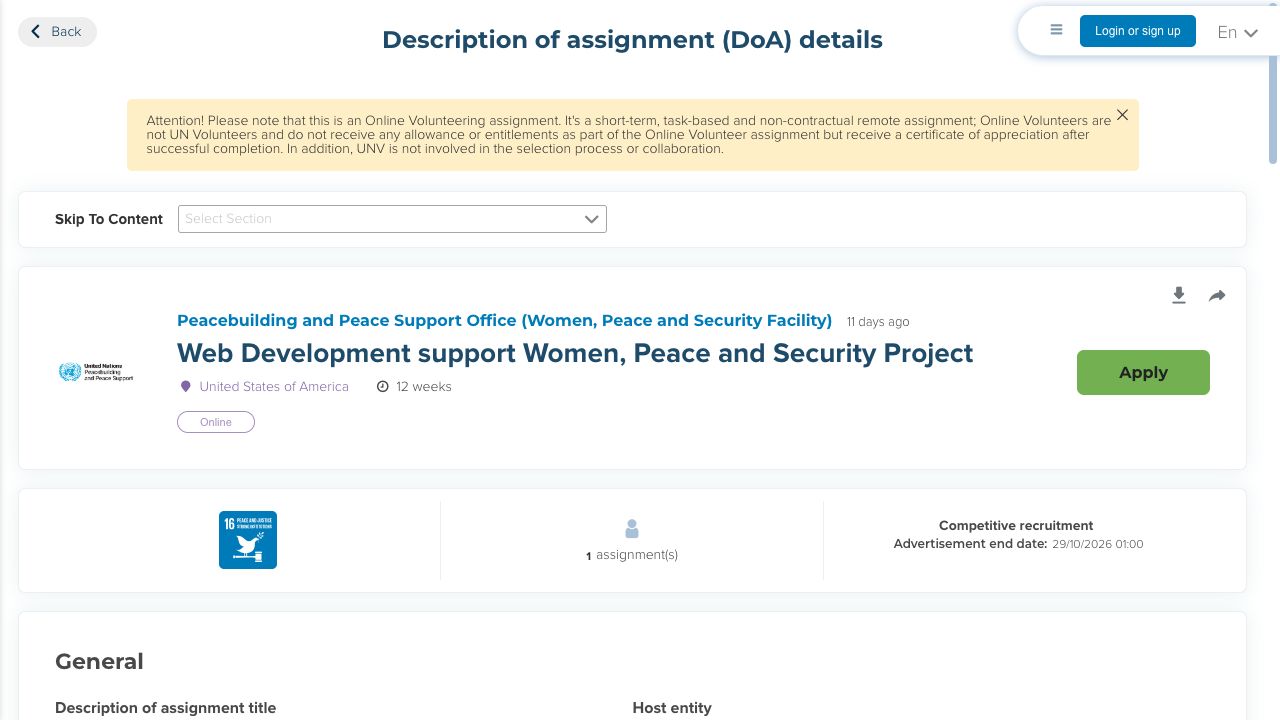
Open the Description of Assignment (DoA), rather than applying from the title alone. Record the host entity, assignment country, modality, category, duration, start date and advertisement end date. Read the tasks and required qualifications together.
For Online Volunteering, read the notice above the assignment title explaining the unpaid arrangement. Check the modality alongside the country and duration: a country label does not mean an online opportunity includes relocation.8
Check whether you can deliver the work within the advertised hours. For onsite service, consider living conditions as carefully as the role. Separate a required language or qualification from an asset, and identify the evidence you can give for each requirement.
3. Create your candidate account
Choose Login or sign up in UVP, then Sign up now if you have no account. Verify your email, create and confirm a password, and enter your gender, given name, surname and date of birth. Read the terms and privacy policy before accepting them.
After registration, UNV’s walkthrough directs you to choose I am a candidate and complete the candidate profile. Keep the registration email and UVP user ID. The official instructions require information to be entered in English, French or Spanish, even when you translate the interface into another language.4
Use an email you expect to retain after graduation or a change of employer. If you already registered, use the same account and its appropriate sign-in method.
4. Complete the structured profile
Open Complete Candidate Profile, or use the profile menu’s edit option. The official UNV-linked profile walkthrough covers these records:
- Phone and country code; current and permanent addresses; emergency contact.
- Travel details, including document upload and departure city or airport where applicable.
- Education, professional licences or certifications, training and computer skills.
- Languages, including the native-language entry required for profile completion.
- Professional experience, references and permission to contact your current employer.
It also explains the refugee-status and disability/accommodation options. Follow the live form’s required markers and applicable document instructions. For uploads, selecting a file with Choose is followed by a separate Upload action in the walkthrough.5
Before entering referees, ask whether they are willing to be contacted and confirm their current contact details. Choose people who can explain the work or study you have listed. Follow UVP’s required reference fields; if a former supervisor is unreachable, ask UNV which alternative it will accept rather than inventing contact information.
Review and submit the profile; UVP flags missing mandatory information. This makes the profile ready for applications, rather than applying to an assignment automatically.5
A CV can help you organize dates and achievements. If you use the CV builder, transfer the relevant information accurately into UVP; do not assume an uploaded CV replaces its structured records.
5. Write the assignment-specific application
Select the intended DoA and Apply. UNV’s competitive-application walkthrough shows a typed motivation statement, relevant experience, availability and additional questions. Prepare your motivation for the form rather than assuming an uploaded cover letter replaces it. Total professional experience is calculated from the work history, so correct that history before relying on the total.
Availability: Give the date you could realistically start after notice of selection. Consider your notice period, studies and other commitments before answering.6
If UVP warns that the assignment requires references missing from your profile, close the warning, update the profile and return to the application. The application walkthrough specifically documents this check.6
Use the motivation statement to explain why this task and host interest you, which requirements you meet, and what you would contribute. Give one or two examples tied to the advertised tasks. For a data assignment, identify the dataset or project, your analysis and the output used by others. For a student project, label it as such.
Do not count overlapping periods twice or treat all past work as relevant experience. Your profile is the underlying record; the motivation statement is your explanation of fit for this assignment. If you reuse an earlier statement, rewrite it for this DoA. Keep within the length limit shown beside the motivation field.
6. Check and submit the application
Check the selected assignment, eligibility, motivation, experience and start availability. Complete the remaining questions and acknowledgement, then select Apply. The official walkthrough says an application confirmation email follows.6
Use the advertisement end date shown in the live assignment and apply early. Check the date and time in UVP itself. If the closing time or time zone is unclear, ask UNV before the last day rather than assuming midnight in your country.8
Keep the application confirmation separately from your account-registration email. Check spam and your UVP record if it does not arrive.
What happens after you apply?
UNV’s recruitment procedure distinguishes sourcing and screening from host-entity assessment and selection. A recruiter may search the talent pool for additional candidates, but those candidates still need to apply. No applicant-specific response deadline is established by this process.11
Keep the profile current while applying. UNV’s international-volunteering guidance recommends accessing it at least once a year to keep it active. Pool registration is a way to be considered, rather than a placement guarantee.10
For an interview, prepare examples of your own work that connect to the DoA and its context. Selection can lead to further checks and onboarding tasks. Wait for the formal instructions before travel or a start date.
Treat an offer as confirmed only when you receive the formal notification and instructions. To withdraw, the official walkthrough shows Withdraw followed by Confirm. Before using withdrawal to correct a mistake, ask whether you can submit again to that assignment.6
Is UNV paid, and is Online Volunteering different?
UN Volunteer contractual assignments can provide benefits and allowances under their applicable conditions. These support service and are not a staff salary. The arrangement, location and eligibility affect what applies; use the actual offer and current conditions rather than estimating from staff-grade pay.3
Online Volunteering is open to applicants aged at least 18, with assignment-specific skills. Tasks can run up to 20 hours weekly for a maximum of 12 weeks each. Online Volunteers receive no living allowance or financial compensation and are not under a UNV or host-organization contract.
The host selects applicants and issues a certificate of appreciation on successful completion.7
If you are looking for a paid student placement instead, compare the separate internship requirements in the UN internships and early-career guide. An Online Volunteering certificate is evidence of a contribution, not a UN staff appointment.
Official help and common problems
UNV’s candidate resources include registration, profile, application, password-recovery and offer guides. On a phone, follow its account and profile video. Use the current resources when an older screenshot differs from the live interface. UNV warns that some supporting material is being updated after the Conditions of Service changes.9
If you need technical help, provide the assignment number and your UVP user ID through the official support route; exclude your password and verification codes. A fee request is a warning sign: the public assignment’s scam notice says the UN charges no application, processing, interview, training or testing fee.8