
Key Takeaways:
- Apply for UNICEF jobs through the official vacancy’s application link; UNICEF’s global portal uses PageUp, also described as its Talent Management System.
- Most applications need a completed online profile, a CV and a tailored cover letter; consultancies may require a separate financial proposal.
- Internships have their own student, recent-graduate, language and family-relationship conditions.
- Save your work, submit before the notice’s deadline and keep the confirmation email.
Which UNICEF application system should you use?
UNICEF’s global vacancies site links to a PageUp application service at secure.dc7.pageuppeople.com. Its vacancy pages identify PageUp as the provider; some notices call the portal TMS (Talent Management System). These refer to the global UNICEF recruitment route, rather than UN Secretariat Inspira.6
The UNICEF organization profile introduces its work for children across health, education, protection and emergency response. Roles span programme delivery, policy, data, supply and operations; read the vacancy for the team’s actual function.
Start with current UNICEF jobs, then follow the official notice. A national UNICEF committee may run a separate recruitment process, so check the actual employer and destination instead of assuming one account covers every UNICEF-branded organization.
The UNICEF application, step by step
1. Check the category and your eligibility
Read the duties, required education, relevant experience, languages, location and contract type before drafting. A junior-sounding title does not remove the experience requirement.
- International Professional: UNICEF normally requires an advanced relevant degree. Its category guidance lists one year of relevant experience for P-1 and two for P-2; the actual notice determines the applicable qualifications. For a pay estimate at the advertised grade and duty station, use the UN salary calculator.
- National Officer: These posts are for nationals of the duty-station country. Living or studying there is not the same as holding its nationality.
- General Service: These are locally recruited support roles. Secondary education is required; relevant experience varies by level. Check the notice’s local eligibility requirements.
- Consultancy: Eligibility comes from the assignment’s terms of reference. A short contract can require substantial specialist expertise, and the requested fee must cover the specified costs.2
For internships: You must be at least 18 and enrolled in undergraduate, graduate or doctoral study, or have graduated within the previous two years. UNICEF requires proficiency in English, French or Spanish; the office may require fluency in its working language.
Strong academic performance and motivation matter. You must have no immediate relatives working for UNICEF and no other relatives in your reporting line. Check the individual notice for the required field of study and additional criteria.3
For New York assignments, also read the New York application and immigration guide before making relocation plans.
2. Prepare the profile, CV and cover letter
UNICEF says most applications require all three. The structured profile gives the detailed record; the CV summarizes your relevant background. Neither is a reason to leave the other incomplete.
Gather employment and education dates, qualification titles, language skills and examples of your achievements. Group responsibilities clearly and explain what changed because of your work. Include relevant technical skills and volunteer experience in the CV.
Prepare the cover letter as its own document when the vacancy requests an attachment. A short motivation or screening answer elsewhere in the form does not replace a requested file.
UNICEF recommends a cover letter normally no longer than one page, with two or three paragraphs connecting your qualifications, relevant experience and languages to the role. Explain what you can contribute and why this assignment interests you.1
If you use the CV builder, check the exported file for this vacancy before uploading it. For a student application, distinguish coursework, research, paid work and volunteering accurately; show the relevant contribution without inventing professional experience.
3. Open the vacancy and sign in
Select Apply now on the official notice. The public entry screen asks for an email address and acknowledgement that you have read the privacy statement. Existing applicants are told to reuse the email used for earlier applications; current UNICEF staff have a separate sign-in option.5
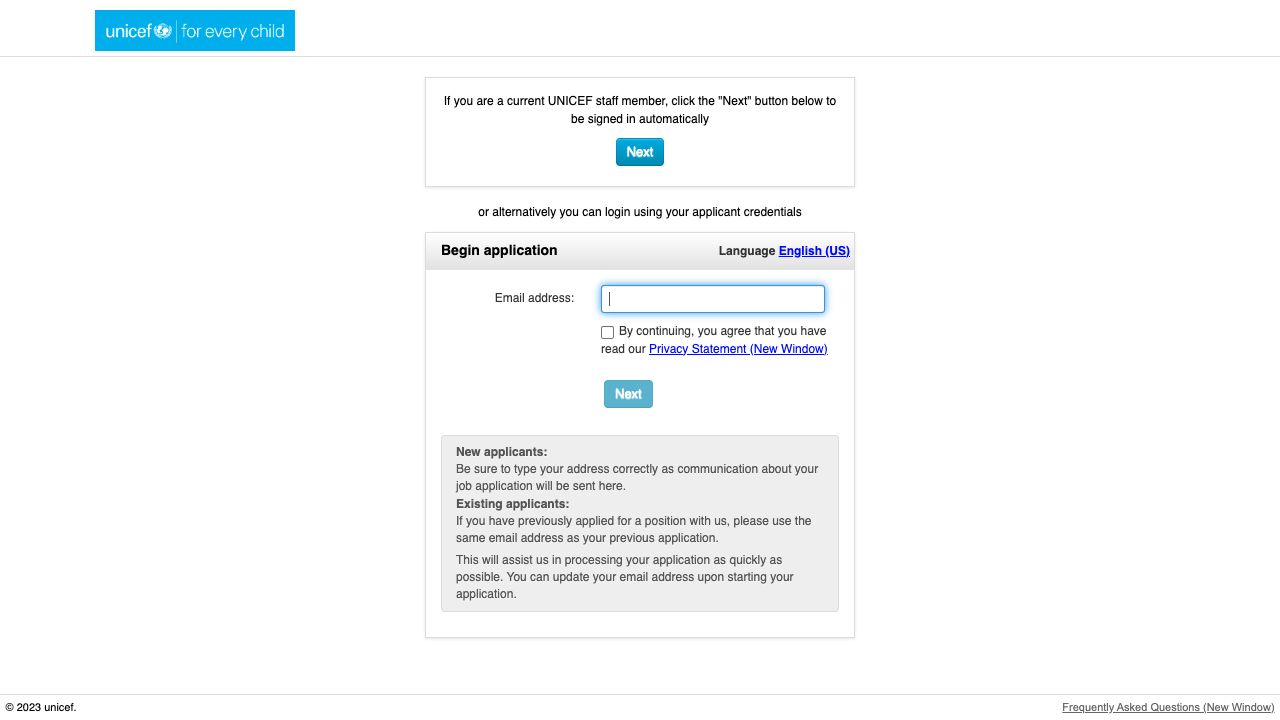
Use an email you can access throughout recruitment. If you already have an account, recover access through the official login rather than creating an unnecessary duplicate.
After signing in, follow the mandatory fields, screening questions and attachment limits in the live form. These can differ between vacancies, so review the instructions for each application.
4. Complete the vacancy-specific answers and attachments
A candidate profile and an application to a particular vacancy serve different purposes. UNICEF encourages keeping the profile current because hiring offices can use it to identify candidates. For an advertised opening, still complete that vacancy’s application and submission.9
Where the form asks eligibility or screening questions, answer each one directly. Match dates, qualifications and experience to your profile. For an experience question, explain the employer or project, your own contribution and a concrete result.
For consultancies: Read every linked terms-of-reference document and proposal template. For example, an October 2026 consultancy required an updated TMS profile, CV, cover letter and a separate financial proposal in its specified template. Check whether your own notice requests a methodology, work sample, deliverable-based price or daily/monthly fee.6
Multiple applications and corrections
Keep your core employment history accurate and tailor the cover letter and vacancy-specific answers for each role. Give files distinct names, such as UNICEF-596443-cover-letter.pdf, and keep a copy of each submitted version.
If you spot an error after submitting, check the account’s available controls and ask the recruiting office how to correct it. Do not withdraw just to edit: first confirm whether that particular vacancy permits a replacement application before its deadline.
Upload only the requested files, observe the live format and size limits, and reopen each attachment to check readability. Do not send identity or financial information to an unofficial contact offering to complete the application.
5. Review and submit before the stated deadline
Check the job number, contact address, dates, eligibility answers and attachments together. A useful final check is to read each required qualification in the notice and locate your supporting evidence in the application.
UNICEF permits saving an application and returning later. Saving is preparation; finish the submission and retain its confirmation email.1
Use the closing date and time zone shown in your own notice and application screen. Check the time zone at closing, especially when daylight-saving time changes between advertising and the deadline. Use UNICEF’s notice rather than assuming your device’s time zone applies.6
After submitting: shortlisting, assessments and waiting
The hiring office reviews minimum qualifications such as education, relevant experience and languages, and may use additional criteria to narrow the shortlist. UNICEF says this stage can take days, weeks or months depending on the office and vacancy. That is a range, not a promised response time.7
Shortlisted candidates may face technical or competency interviews, written exercises, presentations or other assessments, with reference checks and further procedures as applicable. Save the notice and your submitted examples so you can prepare for the actual invitation.8
A portal update or silence does not establish that you have an interview, rejection or offer. Check your account and email, including spam, and follow any instructions from the recruiting office.
Internships and volunteering are different routes
UNICEF internships usually last six to 26 weeks. Interns receive a living-expense stipend from UNICEF or a partner; additional travel or visa support depends on funding. Some assignments allow part-time or remote work. An internship does not guarantee later employment; eligibility for subsequent roles remains subject to UNICEF’s rules.4
UNICEF’s UN Volunteer assignments are recruited through UNV rather than directly by UNICEF. Use the UNV application guide for that separate route. UNICEF also identifies opportunities through its National Committees, which should be checked with the relevant committee.10
Official application help
UNICEF’s application guidance also links to its Agora written-application course. UNICEF charges no recruitment fees and does not request banking information during recruitment; a demand to pay to submit or advance is a warning sign.1