
Key Takeaways:
- Apply for WFP jobs through the official Workday vacancy link; emailing a CV does not submit an application.
- Check the contract category and nationality or work-permit restrictions before completing the form.
- Complete the online history as well as attaching your CV and cover letter.
- Read the vacancy’s full deadline, including its stated time zone, and keep evidence of submission.
1. Find the official WFP vacancy
Start at WFP job openings. The official entry currently leads to Workday. Follow the link from WFP rather than relying on an old recruitment-system bookmark.1
The WFP organization profile introduces its food, cash and nutrition assistance and work on resilience. Alongside programme roles, its operations rely on logistics, supply chains, data and other specialist functions.
You can also browse WFP jobs on IGO Jobs to compare opportunities, then open the employer’s notice to apply. Save the job title, requisition number and notice text. These identify the exact competition if you need support or receive an assessment invitation later.
Read the whole notice before pressing Apply. Distinguish the minimum education, experience and languages from desirable qualifications. A role involving food assistance may still be primarily a finance, logistics, procurement, technology or administrative job: show evidence for its actual function.
2. Check which WFP route you qualify for
The contract label matters. International Professional, National Professional Officer, General Service, consultant and Service Contract vacancies can have different eligibility conditions. WFP’s General Service guidance says applicants who are not nationals need a valid residence and work permit and must live within commuting distance. Do not assume every locally recruited notice accepts a candidate who would relocate later.2
Check any restriction to nationals, existing UN staff or another stated group in the individual notice. Compare your qualifications with the required level and subject, then count relevant experience using your actual employment dates. A desirable qualification is useful evidence; it does not waive a minimum requirement.
Students, recent graduates and JPO applicants
Internships: WFP’s programme requires at least two completed undergraduate years. Applicants must be enrolled and have attended classes within the past 12 months, or have graduated within the past six months and attended classes within the past 12 months. English fluency and other programme conditions also apply.
Junior Professional Officers: JPO opportunities are donor-funded, with sponsor-specific conditions. WFP’s general criteria include an advanced degree, or a first degree with additional relevant experience, and at least two years of relevant professional experience. Check the sponsor’s eligibility and application instructions as well as the WFP notice.2
Use the programme dates carefully: “recent graduate” is an eligibility window, not a general description of anyone early in their career. If you are comparing agencies, the Inspira application guide explains the separate UN Secretariat process; an Inspira profile is not a WFP application.
3. Prepare your Workday account and profile
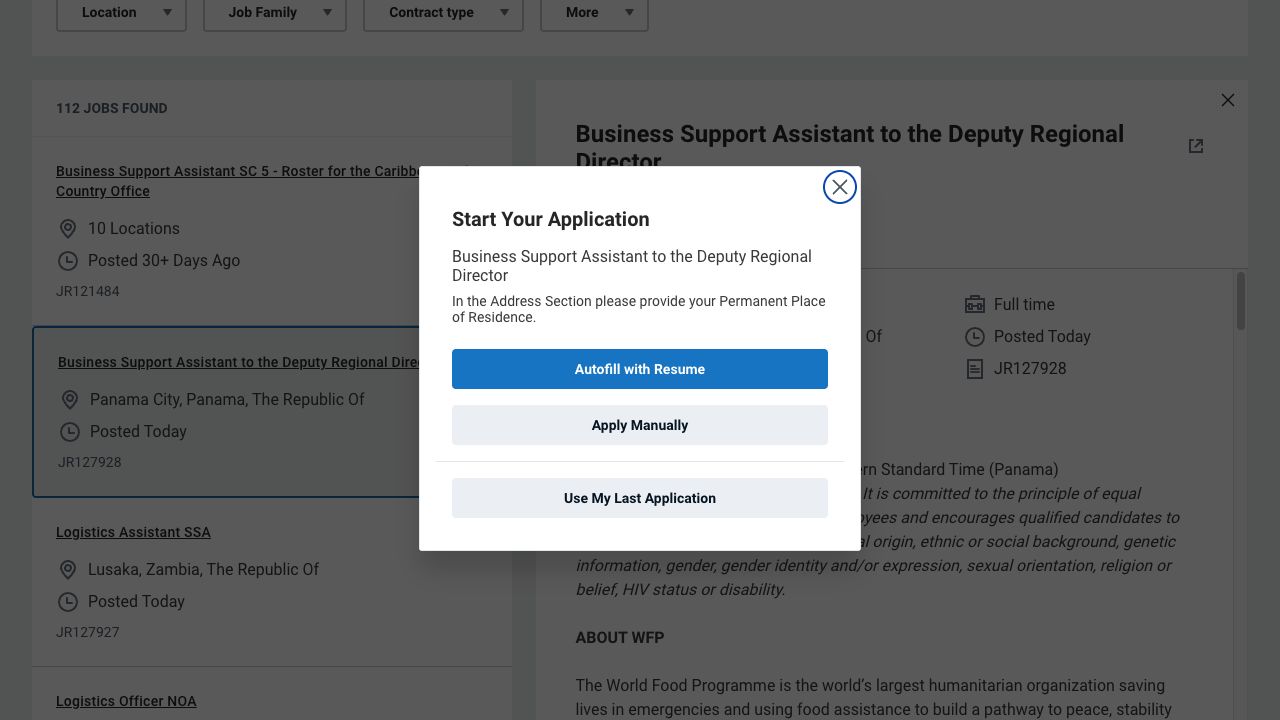
Open the chosen vacancy and select Apply. The public Workday entry offers Autofill with Resume, Apply Manually and Use My Last Application. It also asks you to use your permanent place of residence in the address section.6
The sign-in screen offers Apple, Google, LinkedIn or email. The email route asks for email and password, with password recovery. Create Account asks for email, password and password confirmation, followed by consent to the displayed terms and data-privacy statement. Read these before registering.
WFP says accounts from its previous platform need a new account on Workday; reuse an existing current-platform account where possible.6
The illustrated vacancy’s public progress bar lists My Information, My Experience, two sets of Application Questions, Voluntary Disclosures and Review after sign-in. Follow the sequence and required fields for your own opening.6
WFP’s published instructions call for a complete Workday profile covering employment history, academic qualifications, language skills and UN grade where applicable.3 Prepare the following records before starting:
- Employment: employer names, job titles, start and end dates, and a concise account of your responsibilities and contributions.
- Education: institution names, exact qualifications, study subjects and dates. Distinguish completed qualifications from study in progress.
- Languages: the languages you actually use and an honest assessment of proficiency, particularly those required by the notice.
- UN employment: your correct grade if you hold one. Applicants without a UN grade should follow the form’s available option rather than inventing an equivalent.
Use these records to complete the sections presented in your application. Follow the live mandatory fields and any instructions specific to the vacancy.
If the system imports information from your CV, read every resulting entry. Check dates, employer names and degree titles instead of assuming that a successful upload means the structured history is correct. For an early-career application, describe an internship, research project or student responsibility accurately; do not present it as full-time professional employment.
4. Tailor the CV, cover letter and answers
WFP’s current vacancy instructions identify a CV and cover letter as the documents required at application stage. Prepare both as files for the document instructions; a typed application answer does not replace a requested cover-letter attachment. Passports, certificates and recommendation letters may be requested later.3 Read your own notice for document language and any specific instructions, and use the upload limits shown in the live form.
Keep certificates ready for a later request. If the initial document list asks only for a CV and cover letter, follow that list rather than uploading every record.
CV: bring the experience most relevant to the selection criteria into clear view. Describe what you did, the tools or methods you used and a supported result. Ensure dates and qualifications agree with the profile.
Cover letter: explain why this function and assignment fit your background. Choose two or three requirements and connect them to concrete evidence. A generic statement about wanting to help people does not explain whether you can perform the advertised work.
For example, a monitoring applicant could explain how they checked partner reporting, resolved inconsistent indicators and produced a consolidated report. Use your own scale and results; this is an illustration of useful evidence, not wording to claim without that experience.
Application questions: if the form asks about eligibility, experience or availability, answer the question as written. Check that any yes/no answer agrees with your history. Where a written example is requested, name the setting, explain your own action and give a verifiable outcome. Do not replace an answer with “see CV”.
5. Review and submit before the stated deadline
WFP notices can display a closing date with a time and named zone. One official notice, for example, specified 23:59 Pakistan Standard Time. Do not assume a universal Rome or New York deadline. Read the full deadline on your own vacancy and convert it for the correct date.4
- Confirm the requisition number and that you meet any nationality or applicant-group restriction.
- Check every mandatory field, declaration and vacancy-specific answer.
- Open the attached CV and cover letter to check that the right versions are readable.
- Check your email address and complete the final submission action.
A saved profile or unfinished application is not enough. Keep the acknowledgement or submission record provided by the system, along with your final documents. If you cannot find confirmation, check your account and spam folder before assuming submission succeeded.
Review carefully before submitting. If you need to correct a submitted application, check the available controls and contact official support if necessary. Before withdrawing, confirm whether you would be able to reapply to that vacancy.
6. Follow the recruitment process
WFP’s standard instructions say only shortlisted candidates will be contacted, and selected candidates undergo reference and background checks.3 Check your email and account, but do not infer an interview or rejection from an unexplained portal label. Keep applying to other suitable vacancies while you wait, and follow any response deadline in an invitation.
If invited to an assessment or interview, reread the saved notice and the examples in your application. Prepare to explain your personal contribution, decisions and results; our guide to interview examples from outside the UN can help you identify relevant evidence.
FIT Pool applications are a separate competition
The Future International Talent Pool is an assessed recruitment pool, rather than a general CV registration. Apply only to an open pool for which you meet the requirements. WFP describes technical assessment, profile screening, language testing, interview and background checks, with successful applicants placed in a pool for two years. Pool membership does not itself mean an appointment is available.5
When an application will not go through
Keep a separate copy of your written answers. For an error, record the requisition number, exact message, time and the step where it occurred. For an attachment problem, first check the live size and format restrictions and whether the file appears after upload.
WFP lists [email protected] for technical application problems and [email protected] for reasonable accommodation. The technical inbox does not accept applications or unsolicited documents. WFP does not charge recruitment fees.3
A support email does not replace the online submission or establish a deadline extension. Report a problem early enough to follow any instructions you receive.